Specialized Solution for Mobile Repair Centers
The complete system for mobile repair shops & service centres.
From device intake and IMEI search to technician assignments, automatic WhatsApp updates, thermal receipts, and GST invoices — run your entire mobile counter with zero paper clutter.
Free trial
3 Days
No card needed
Job cards & IMEI
Unlimited
Permanent history
Starting price
₹14/day
or ₹1,499 / 3 mo
Support languages
3 Languages
Marathi, Hindi & English
Built for Mobile Counters
Everything a mobile technician needs. Nothing they don't.
Generic billing software doesn't understand IMEIs, pattern locks, touch issues, or technician commissions. Kiwikit is built from the ground up for phone repair workflows.
IMEI History & Device Search
Search by IMEI, serial or mobile number. Know every previous screen replacement, motherboard fix, and customer note before opening the phone.
Thermal Receipts & Label Stickers
Print 2-inch or 3-inch thermal customer receipts and stick a small barcode label directly on the phone back glass to prevent mix-ups.
Automated WhatsApp Alerts
Keep customers notified when a device is received, estimated, or ready for pickup. Reduce repetitive counter status calls by up to 80%.
Technician Workload & Profit
Assign display repairs to one technician and IC/board repairs to another. See parts cost, technician payouts, and net shop profit per job.
Second-Hand Mobile Register
Record old phone purchases with instant ID proof OCR scanning. Generate police-compliant verification slips and maintain resale margins.
GST & Non-GST Billing
Generate professional estimates, tax invoices, and payment receipts. Track cash in counter, online UPI collections, and supplier balances.
How It Works
One repair lifecycle, five clear stages.
Intake
Customer details, IMEI search, issues, pattern lock & advance taken.
Assign
Pass job to display or motherboard technician with promised date.
Diagnose
Parts required logged, price estimated, customer approves on WhatsApp.
Repair & QC
Job completed, internal testing verified, notification sent.
Delivery
Thermal receipt printed, balance collected, warranty activated.
Inside the software
The actual screens your counter will use
Not mockups — these are real Kiwikit screens running on sample shop data.
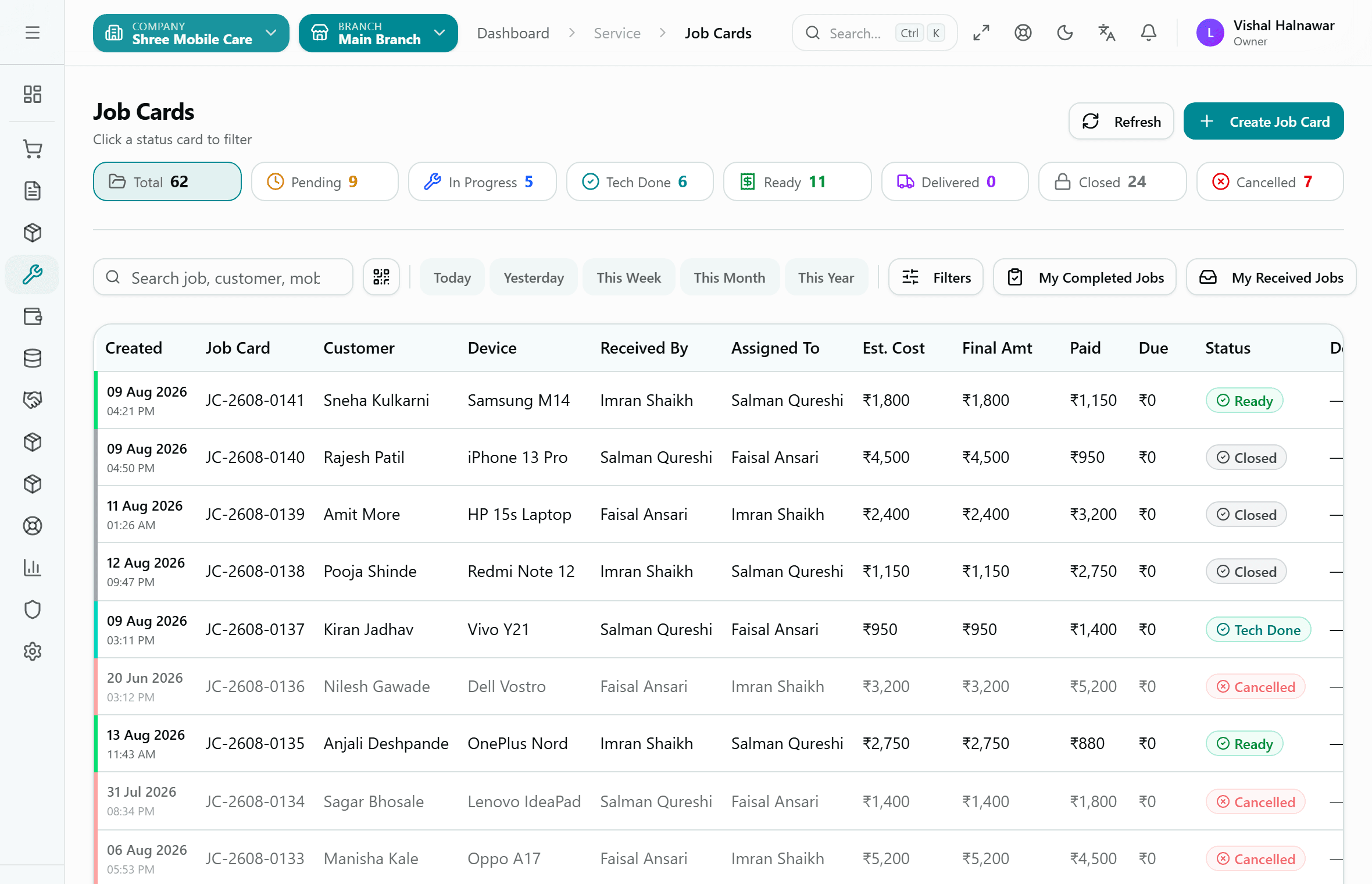
Every open repair on one screen
The job card list is the shop's control room. Status cards across the top double as filters, so 'show me everything ready for delivery' is one click, not a scroll through a register.
- Filter by Pending, In Progress, Tech Done, Ready, Delivered, Closed or Cancelled
- Search by job number, customer name or mobile — or scan the job card barcode
- See who received the device and which technician it sits with
- Estimated cost, final amount, paid and due, per row
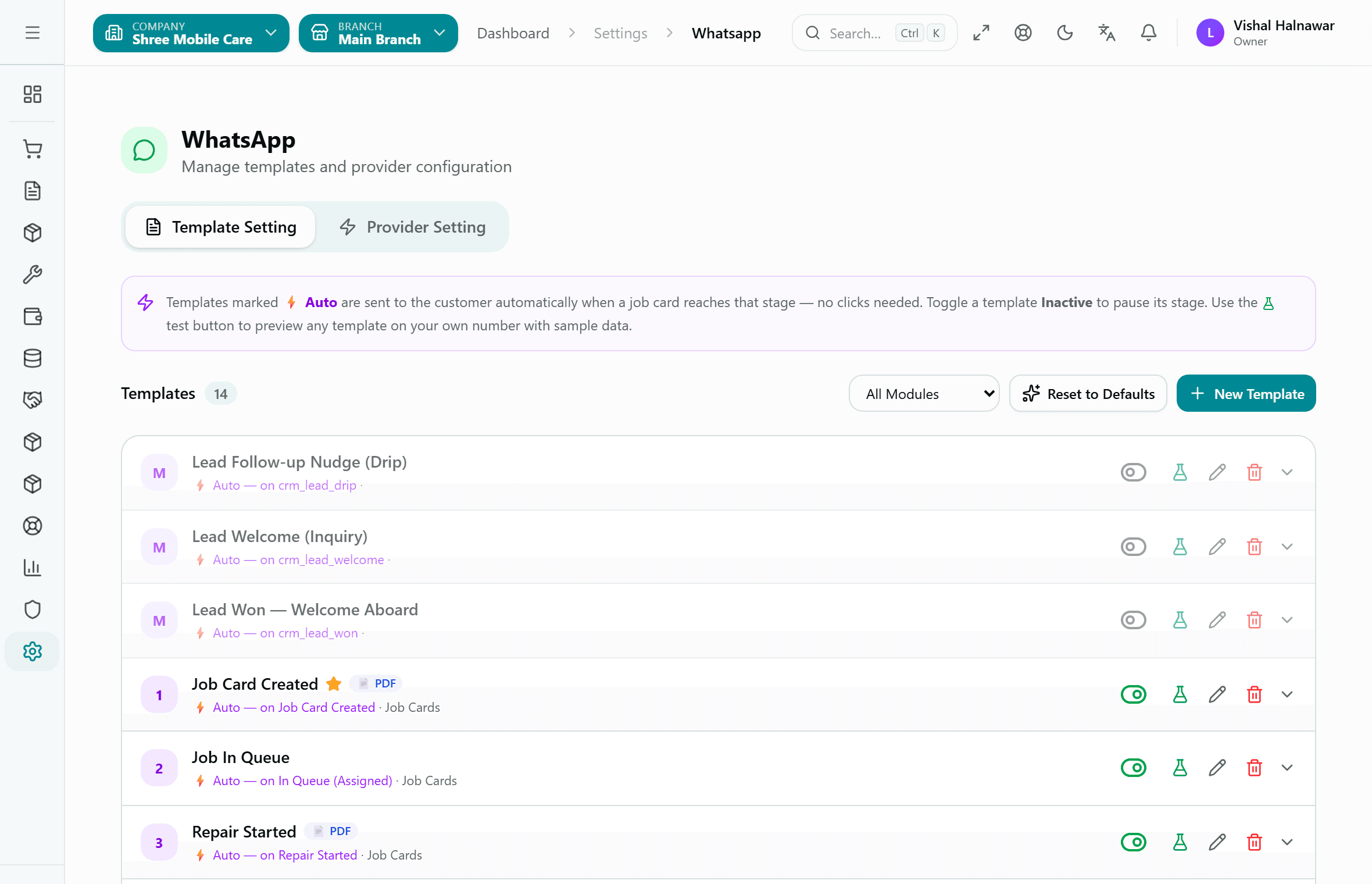
WhatsApp messages that send themselves
Templates marked Auto fire when a job card reaches that stage — nobody has to remember to message the customer. Each one can be previewed on your own number before you switch it on.
- Ready-made templates for Job Card Created, In Queue, Repair Started and later stages
- Attach a PDF job card or invoice to the message
- Turn any stage's message off without touching the rest
- Templates also cover CRM follow-ups, not just repairs
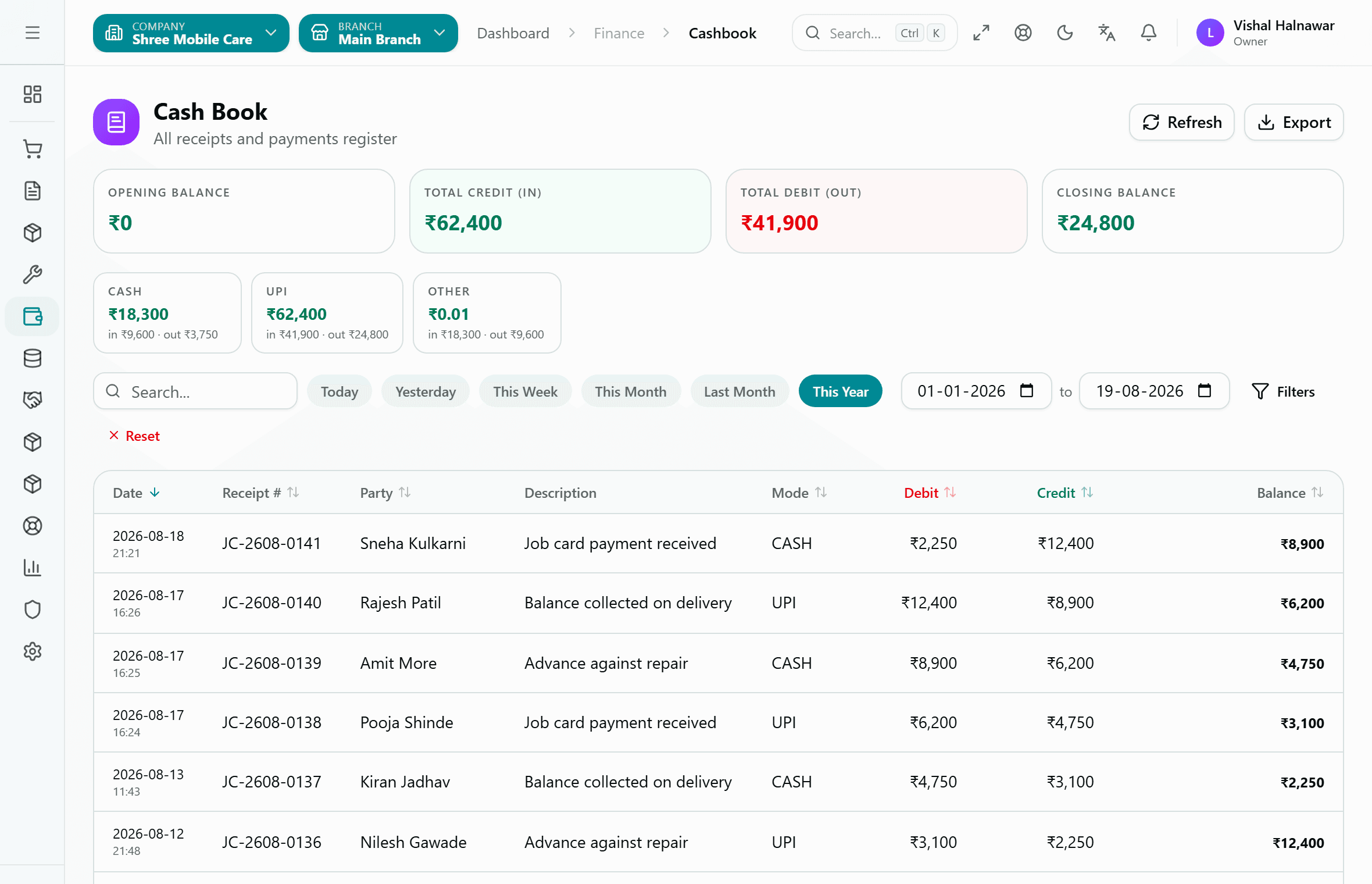
Counter cash, reconciled without a separate book
Advances taken at intake and balances collected at delivery post straight into the cash book against the job card number — so the day's closing balance is already done when you shut the shutter.
- Cash and UPI tracked separately, with in and out for each
- Every entry carries its job card number and customer name
- Opening and closing balance for any date range
- Export the register when your accountant asks for it
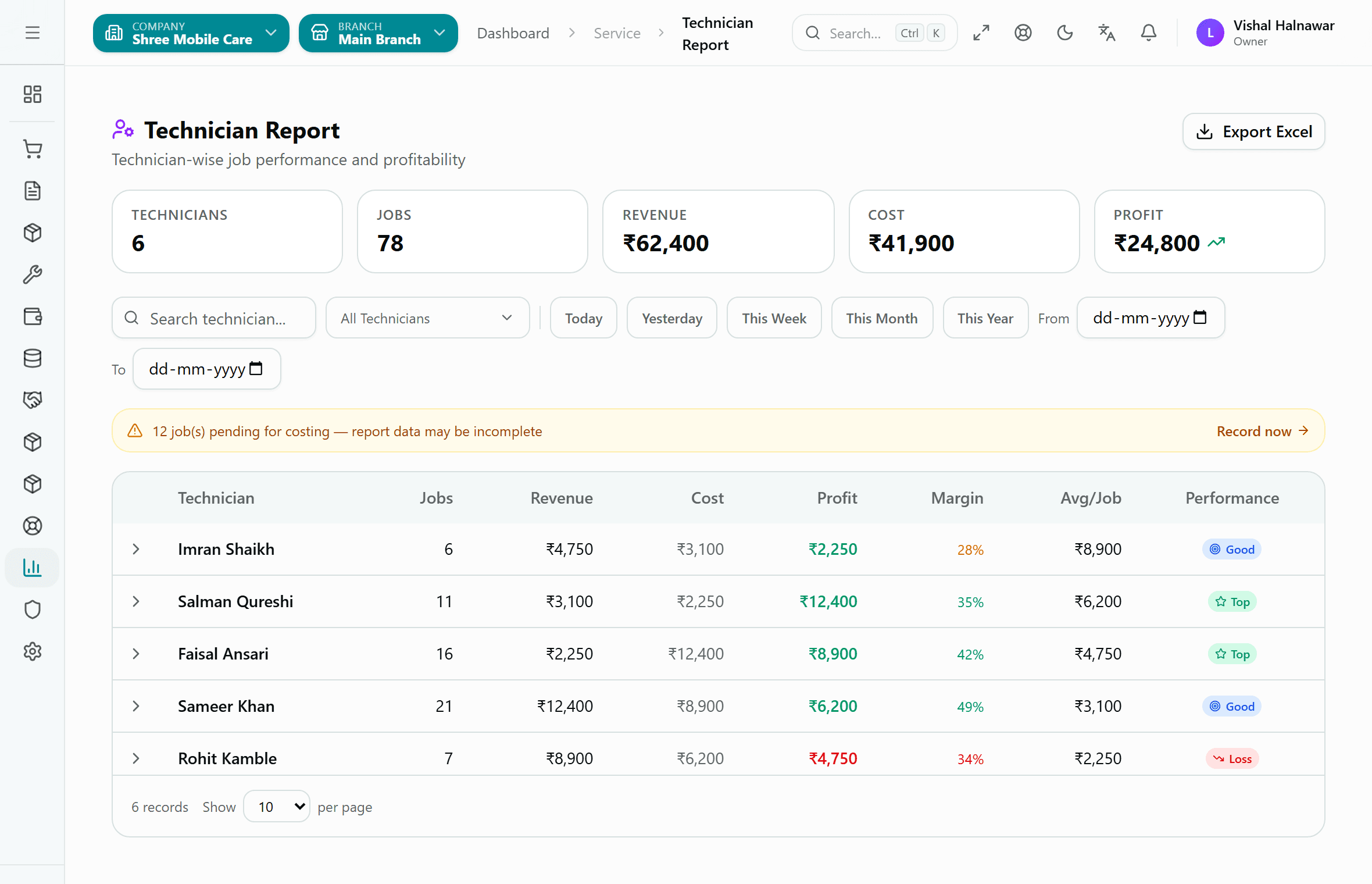
Which technician actually makes you money
Counter turnover hides the answer. This report splits revenue and parts cost per technician, so a busy bench running at a loss is visible before the month closes.
- Jobs, revenue, cost, profit and margin per technician
- Average value per job, to spot who is taking only small work
- Warns when jobs are still pending costing, so the numbers are not read half-finished
- Filter by today, this week, this month or a custom range
One system, not five apps
What runs alongside your repairs
Most repair shops end up stitching together a job card app, a billing app, a parts register and a separate accountant's Tally file. Kiwikit carries all of it in one login, so a part issued to a repair leaves stock and hits the books in the same step.
Parts inventory & stock
Track spare screens, batteries and ICs with batches, serial numbers and multiple warehouses. Stock adjustments, transfers and reconciliation are built in, so the shelf and the system agree.
Purchase & suppliers
Raise purchase orders, record supplier invoices and receipts, and handle purchase returns and debit notes. Supplier balances stay linked to the parts they supplied.
Sales & accessories counter
Most repair shops also sell covers, chargers and tempered glass. Quotations, invoices, delivery notes, returns and credit notes run in the same system as the repairs.
Accounting & GST
Cash book, ledger, journal entries, expenses, bank accounts and bank reconciliation — plus receivables and payables — so the shop's books are a by-product of daily work.
Second-hand device register
Buying and reselling used phones has its own purchase register, sale register and stock view, kept separate from repair jobs and from new-goods inventory.
CRM & follow-ups
Leads, customers and scheduled follow-ups with overdue flags, for shops that chase warranty renewals or corporate accounts rather than waiting at the counter.
Before you start
What you actually need
Kiwikit runs in the browser, so there is nothing to install and no licence key to lose. The same login works on the counter PC, a tablet on the bench, and the owner's phone at home.
- Any device with a browser — counter PC, bench tablet or the owner's phone
- A working internet connection (Kiwikit is cloud-based, not an offline install)
- Optional: a 2-inch or 3-inch thermal printer for customer receipts
- Optional: a thermal barcode label printer for device stickers
Plans include 4 users and one shop location, and start at ₹1,499 for three months or ₹4,999 for a year. Full breakdown on the pricing page.
An honest read
Is this right for your shop?
It fits well when
- You handle enough repairs that 'which phone was that?' has become a real question
- More than one person touches a device between intake and delivery
- Customers call to ask status, and those calls eat your counter time
- You want parts cost and technician profit visible, not just daily collection
It is probably overkill when
- You are a solo technician doing a handful of repairs a week — a notebook or spreadsheet is genuinely enough at that volume
- Your shop has no reliable internet; there is no offline desktop version
- You only sell accessories and never take in devices for repair — the job card workflow is the point of Kiwikit
FAQ
Common questions from mobile shop owners
Can I search repeat repairs by IMEI number?+
Does it support thermal receipt and barcode label printers?+
How do WhatsApp customer updates work?+
Can I manage second-hand phone buying and resale?+
Do you provide support in Marathi and Hindi?+
Do I need to install software, and does it work offline?+
Does Kiwikit handle parts inventory and accounting, or only job cards?+
Start running your mobile repair shop on Kiwikit today.
3-day free trial with every feature unlocked. Same-day setup and free old data migration.
Explore more
Go deeper on digital job card software, see the same workflow for laptop and computer repair shops, or compare the market in our best mobile repair software guide.